Device and Access Manager
Terminal settings
Terminal settings
Terminal Overview
Engineer PIN
Firmware settings
Device Settings
Fingerprint settings
Faceprint Settings
Proximity Device Settings
Device status
Sites
Areas
Managing Terminals
Users
Tools
System Settings
User Groups Feature Overview and Setup
Clocking Analysis Feature
Moving a Terminal
Device Status Email Alerts
Device Manager Data Flow
Smart Biometric Clock (T2) Device
Smart Biometric Clock (T2) User Enrolment
Smart biometric clock (T2) User Onboarding Screens
Enrolling Users on the Smart biometric clock (T2) for Fingerprint recognition
Additional devices
Turnstiles
Fire Alarm Interface
Weigand readers
Weigand overview
Weigand portal configuration
Connecting a Weigand reader to the T2
Wiegand 36-bit
Wiegand Generic
Wiegand Hexadecimal
Wiegand Alphanumeric
Testing Weigand cards on the T2
Fire alarm interface documentation – Web Portal, Smart biometric clock (T2) Firmware and Hardware
Barcode Readers
Smart biometric clock (T2) Factsheet
Smart Biometric Clock Installation Guide Video
Smart biometric clock (T2) Installation Guide
Smart biometric clock (T2) network requirements
Third-party proximity readers
Smart biometric clock (T2) Offline Troubleshooting
Smart biometric clock (T2) UPS Solution
Smart biometric clock (T2) UPS User Guide
Mobile Clocking Feature
Upgrading Device Firmware
Issue affecting Smart biometric clocks on Thursday 9th October 2025
Portal release documentation
Portal Release notes - 29th July 2026
Portal Release notes - 5th November 2025
Portal Release notes - 17th September 2025
Portal Release notes - 30th July 2025
Portal Release notes - 4th June 2025
Portal Release notes - 30th April 2025
Portal Release notes - 26th March 2025
Portal Release notes - 26th February 2025
Portal Release notes - 29th January 2025
Portal Release notes - 6th November 2024
Portal Release notes - 2nd October 2024
Portal Release notes - 21st August 2024
Portal Release notes - 25th July 2024
Portal Release notes - 22nd May 2024
Portal Release notes - 20th March 2024
Portal Release notes - 28th February 2024
Portal Release notes - 31st January 2024
Portal Release notes - 15th November 2023
Portal Release Notes - 11th October 2023
Portal Release notes - 9th August 2023
Portal Release notes - 12th July 2023
Portal Release notes - 14th June 2023
Portal Release notes - 17th May 2023
Portal Release notes - 18th April 2023
Portal Release notes - 22nd March 2023
Portal Release notes - 27th February 2023
Activities
Activities Feature Overview - Web Portal & Smart biometric clock (T2) Firmware
Activities Setup for Device and Access Manager
Activities on Smart biometric clock (T2) Terminals
Firmware release documentation
Firmware Release 2.12.0 - 19th November 2025
Firmware Release 2.11.0 30th July 2025
Firmware Release 2.10.0 - 4th June 2025
Firmware Release 2.9.0 - 30th April 2025
Firmware release 2.8.0 - 26th March 2025
Firmware release 2.7.0 - 29th January 2025
Firmware Release 2.6.0 - 2nd October 2024
Firmware Release 2.4.2 - 12th July 2024
Firmware Release 2.4.1 - 27th June 2024
Firmware Release 2.3.1 - 9th May 2024
Firmware Release 2.3.0 - 16th April 2024
Firmware Release 2.2.1 - 29th January 2024
Firmware Release 1.9.0 - 18th January 2024
Firmware Release 1.8.5 - 9th August 2023
Firmware Release 1.8.4 - 5th April 2023
Firmware Release 1.8.3 - 28th February 2023
Compliance
Biometrics
Biometric Overview
Smart biometric clock (T2) Biometrics - Enabling/Disabling biometrics
Biometrics - Fingerprint Configuration
Biometric - Faceprint Configuration
Biometric - Accuracy and performance
Biometric Data Retention Policy
Smart Biometric Clock Data Flow and Security Controls
Biometric FAQS
MF & AC Hardware Range
- All categories
- Device and Access Manager
- Device Manager Data Flow
Device Manager Data Flow

1. Data flow
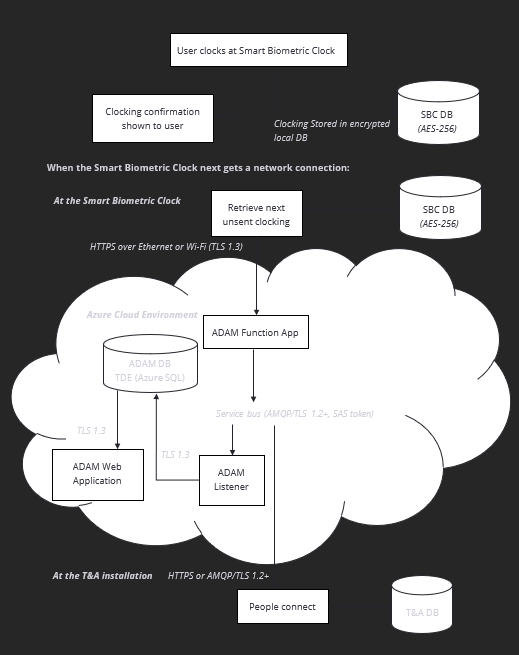
The diagram on the following page demonstrates the data flow through the system, using the example of making a clocking at a Smart Biometric Clock. All other data is transferred using the same techniques.
2. Data storage
Cloud storage
All data is stored in a Microsoft Azure SQL database, encrypted at rest using TDE (see Transparent data encryption - Azure SQL Database & Azure SQL Managed Instance & Azure Synapse Analytics | Microsoft Learn)
All data in transit between Smart Biometric Clock devices and the cloud is transferred using HTTPS (TLS 1.3).
Data in transit between People Connect and the cloud is transferred using HTTPS or AMQP encrypted with TLS (1.2 minimum; TLS 1.3 where supported).
Smart Biometric Clock storage
All non-biometric data is stored in a database file on the device encrypted at rest using 256-bit AES encryption.
Encryption keys are unique for each business.
All data is cleared after a factory reset, change of business, or an upgrade.
Biometric data is stored in a dedicated biometrics database file on the device, also encrypted using 256-bit AES encryption.