Smart Biometric Clock Data Flow and Security Controls

Introduction
Purpose
The OneAdvanced Smart Biometric Clock makes clocking simple, secure and modern. Your employees can clock in and out quickly using their fingerprint, face or proximity card, with instant on-screen confirmation.
This document describes the personal data the device holds, how that data is protected, and what happens to it at the end of your contract.
Your organisation is the data controller for personal data processed by the Smart Biometric Clock. OneAdvanced acts as data processor. Biometric data constitutes special category personal data under UK GDPR Article 9 and is handled accordingly.
What data does the device hold?
Each Smart Biometric Clock holds, locally and in encrypted storage:
- User identity records: employee identifier and associated metadata sufficient to match a clocking to a person
- Biometric templates: a mathematical representation of each enrolled user's fingerprint and/or facial geometry
These are stored in two separate encrypted databases on the device.
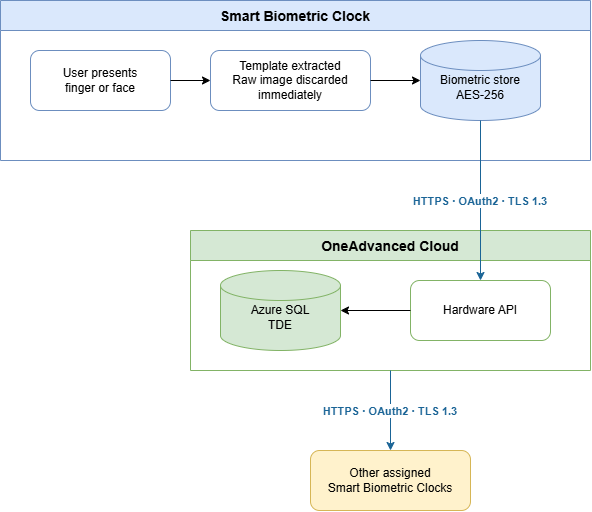
No raw biometric images are stored on the device. When a finger or face is enrolled, the device extracts key data points and generates a template – a numerical representation of the key features. The raw image is immediately discarded and cannot be recovered from the stored template. It is not possible to recreate an image from the biometric template data.
Biometric enrolment
Enrolment takes place at the device. When the user presents their finger or face, the device captures the biometric, extracts a mathematical template, and immediately discards the raw image. The template is encrypted and stored locally on the device.
Once enrolment is complete, the template is transmitted to the OneAdvanced cloud environment so that it can be distributed to any other Smart Biometric Clocks within your business that the user is assigned to. This transmission takes place over HTTPS, authenticated using OAuth2, and is protected by TLS 1.3.
Face enrolment can include a liveness check (gaze direction validation) to prevent clocking from a photograph or other spoofing attempt.
Data flow
Clocking
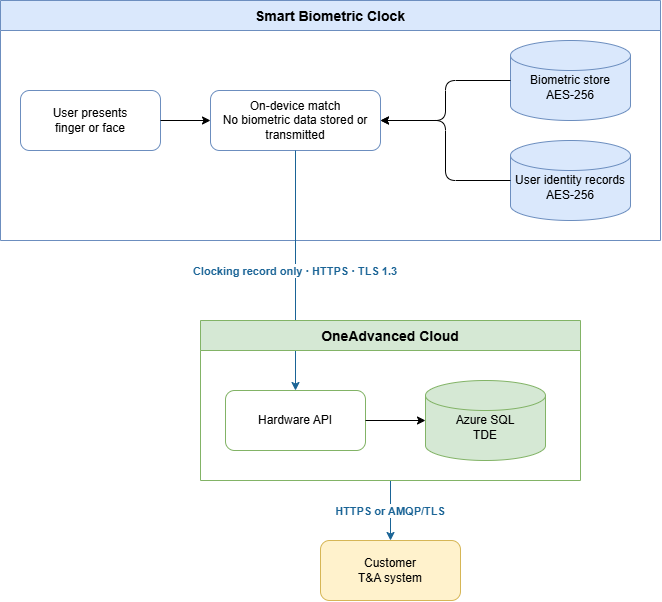
At the point of clocking, the user's biometric is captured and matched against stored templates entirely on the device. No biometric data leaves the device during a clocking event. Only the resulting clocking record (timestamp, user identifier, and device identifier, plus direction, clocking method, etc.) is transmitted to the cloud.
Data flow
Security controls
Location | Data | Control |
On the device: user records | Identity records at rest | Encrypted database, AES-256, unique encryption key per customer |
On the device: biometric store | Biometric templates at rest | Separate encrypted database, AES-256, unique key per customer |
Device to cloud | Clocking records and configuration in transit | HTTPS, TLS 1.2 minimum, TLS 1.3 where supported |
Device to cloud | Biometric templates in transit (enrolment and sync only) | HTTPS, OAuth2 bearer token authentication, TLS 1.3 |
Device to cloud | Service bus messages | AMQP encrypted with TLS, authenticated with a scoped access token |
Cloud (Azure) | All data at rest | Transparent Data Encryption (TDE) via Microsoft Azure SQL |
Cloud to customer T&A system | All data in transit | HTTPS or AMQP/TLS |
No biometric data is transmitted in raw image form at any point. Biometric data is only transmitted in two circumstances: when a user enrols, and when the portal distributes a template to an additional assigned device.
No biometric data is transmitted to the time and attendance system, or to any other external system.
Data lifecycle and end of contract
When a contract ends, the customer administrator deactivates the device via the OneAdvanced web portal. This immediately and automatically:
- Deletes all biometric templates from the device
- Deletes all user records from the device
- Clears the device's registration
No physical access to the device is required. All special category personal data held on the device is removed in a single action. A physical factory reset is also available as an alternative if required.
Third-party components
The Smart Biometric Clock incorporates two licensed third-party components in its biometric pipeline:
- Crossmatch: fingerprint sensor component
- Innovatrics IDKit: biometric matching engine, used for both fingerprint and face identification
Both components operate entirely within the device under the control of OneAdvanced. Neither vendor ever has access to customer data, and neither component transmits or receives any data outside of the device.